What was uploading my data at night? Hunting Android’s mystery UID -253
There is LOTS of advice out there about treating your phone with a healthy dose of respect. And given that it hold so much sensitive information (and ends up being in some many situations with me) I thought it important to know what it is doing and if there is anything that I should be concerned about.
Monitoring my phone
Over the past few weeks, I have been developing an app (By me, I mean me and Claude / Codex) that looks for unusual indicators on my phone and alerts me if something is amiss. One of the things it does is record how much data every app moves in each 30 minute window and ships it off to a self-hosted Elasticsearch, where I have a Kibana dashboard to graph it all.
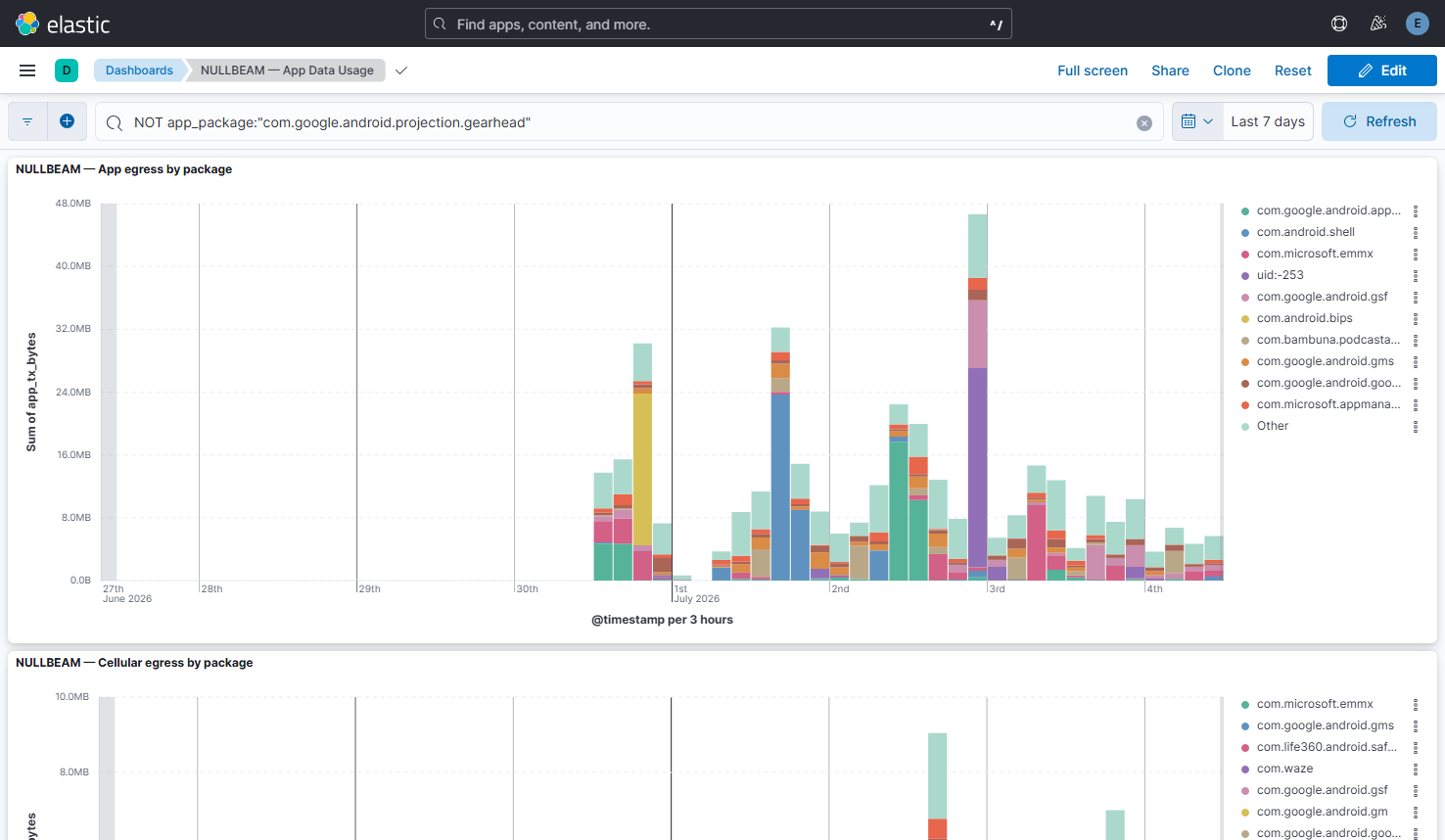
While monitoring the network traffic on my phone I found an unknown process called uid:-253 which was regularly uploading data each night. What caught my attention was the package name, instead of it being the name of an app (Android Auto, WhatsApp, Maps, etc.), It was a UID. And so I did what any good analyst would and performed a few quick Google searches about what it could be, I came up with nothing. I built this to investigate unusual activity, and here was something. The game’s afoot.

How did we get here? The app labels traffic with the package name of the app that moved it and when it can’t find an app for the traffic, it falls back to just showing the raw UID. So this was traffic that Android was accounting for, but that no installed app owned.
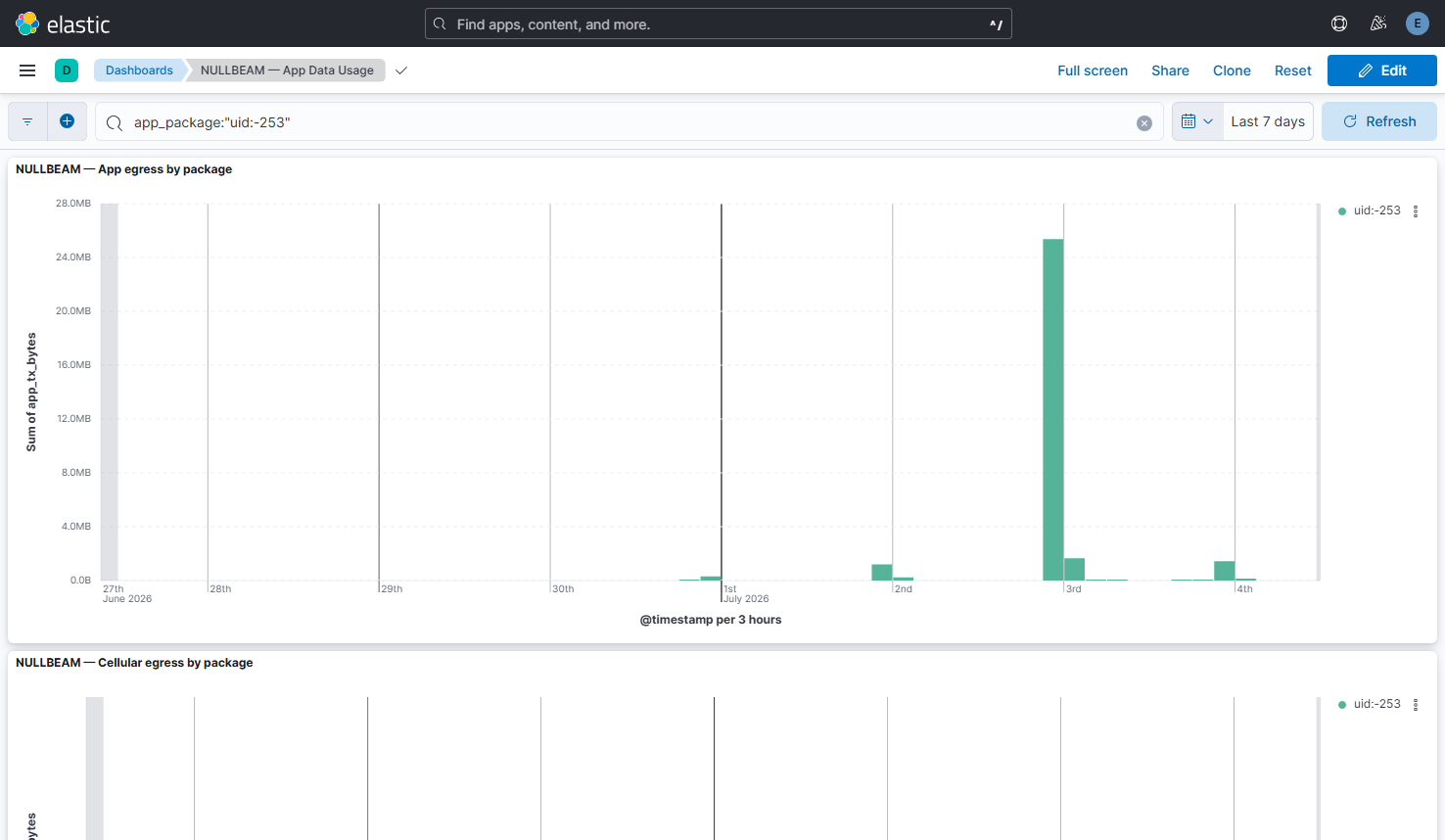
Filtering the dashboard down to just that entry made it more interesting. It only moved data at night, and on the night of the 2nd of July it uploaded over 20MB in a single window.
First attempt - chasing UID 253
I must disclose here, that I do not know much about programming for Android, so I have co-opted Claude to help me with the investigation.
It turns out, that on Android, every app gets its own Linux UID, and the system services have well-known low-numbered UIDs (1000 is system, 1001 is the radio, etc.). So the first thing to do was to connect to the phone via adb and ask it who UID 253 was.
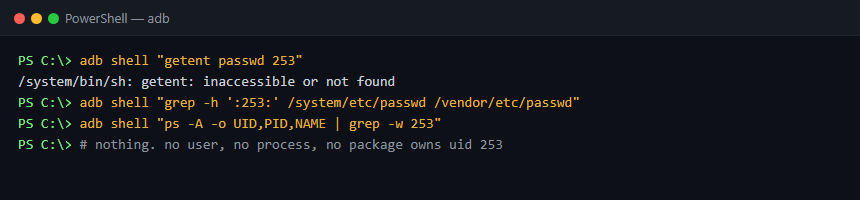
Classic investigation, it turns up nadda. No user is defined with that ID, no process was running as it, and no package claims it. UID 253 simply doesn’t exist on the phone. A dead end — or was it?
Hang on, it’s negative
Going back over the data, I clicked that the UID wasn’t 253, it was -253. A real Linux UID can’t be negative, so this had to be something Android made up. And it turns out Android does exactly that — its network accounting uses a handful of negative “virtual” UIDs for traffic that doesn’t belong to a normal app. The documented ones are -1 (UID_ALL), -4 (UID_REMOVED, apps that have been uninstalled) and -5 (UID_TETHERING, traffic from hotspot tethering).
Back to adb, the phone’s network stats showed three negative UIDs, and two of them were the documented ones.

But -253 isn’t documented anywhere. It wasnt a once off either. The phone’s own accounting had plenty to say about it though — here is its history, recorded against my home Wi-Fi:
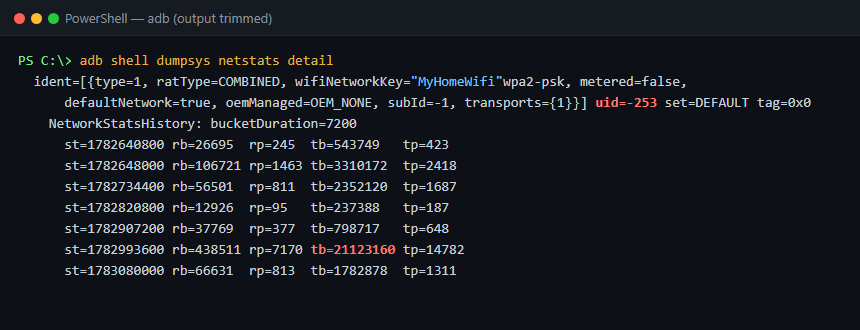
Its traffic flow was always larger outbound then inbound. And decoding the bucket timestamps, every burst lands between about 8pm and midnight.

So: something with no app, uploading every night, with a 21MB burst on the 2nd of July. We are onto something…

Thinking in hex
This next part was all Claude.
The trick that cracked it was realising that -253 might not be meant to be read as a number at all. Android stores these IDs as 32-bit integers, and if you look at -253 as an unsigned 32-bit value instead, you get something much more interesting:

0xFFFFFF03. Android uses values in the 0xFFFFFFxx range as special “tags” for system traffic. Bingo!
To the source, Android Source!
Next, Claude explained that it needed to go back to the Android’s Connectivity module to grep for the tag. Like the plot in a movie, it returned just one result.
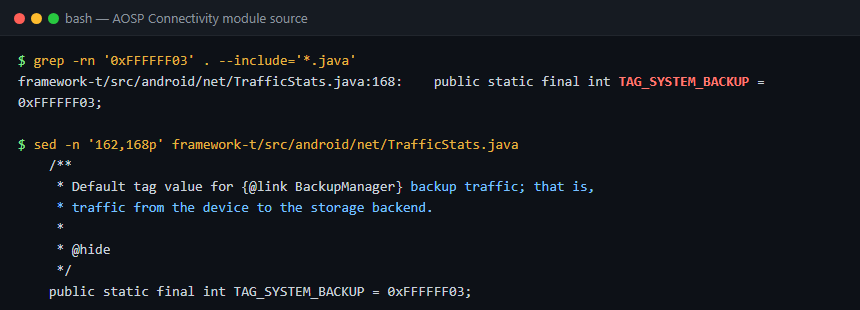
TAG_SYSTEM_BACKUP — a hidden constant in TrafficStats, with a comment that says it all: “Default tag value for BackupManager backup traffic; that is, traffic from the device to the storage backend.”

My mystery night-time uploader was Google Backup. That explains everything: backups only run when the phone is idle, charging and on unmetered Wi-Fi — which for my phone means overnight on the charger. It explains the upload-heavy traffic (backups go up, not down), and the big 21MB night would have been a fuller backup run.
Double checking with Pi-hole
But wait… I wasn’t quite ready to close the case on a source code comment alone, so I went for one more piece of evidence. Fortunately all the DNS on my network goes through a Pi-hole, so I pulled the phone’s DNS queries for the night of the 2nd of July — the 21MB night — and filtered for anything backup related.
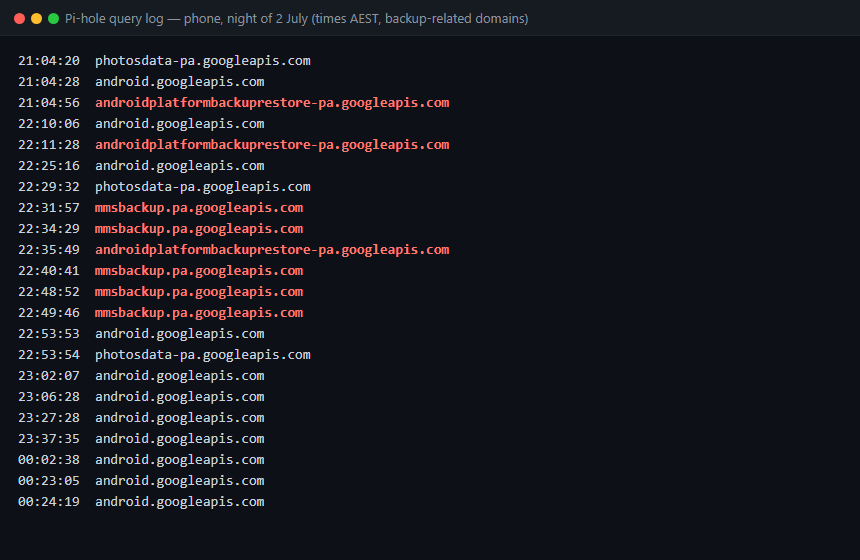
androidplatformbackuprestore-pa.googleapis.com, mmsbackup.pa.googleapis.com, photosdata-pa.googleapis.com — Google’s backup and restore endpoints, queried steadily across exactly the window the mystery traffic appeared in. Case closed.

Wrapping up
So what looked like a process quietly exfiltrating my data at night turned out to be my phone doing exactly what I asked it to do — backing itself up to Google. Slightly disappointing as far as threat hunting goes, but a good result.
Even though Claude took the wheel for part of it, I have learnt a lot about how Android accounts for traffic (I would have worked this out, but it would have taken me a LOT longer):
As for how effective the app is? Well I have caught and been able to investigate this. So not sure if it will catch something more advanced (if I was ever to be the target of something like that). But it is a start.